A Zyxel WX3100-T0 access point can be easily configured using Wi-Fi mesh to boost WiFi coverage. This is most easily done in conjunction with an MPro Mesh compatible router, which will be covered in this document.
An example of an MPro Mesh compatible router is a Zyxel DX3301-T0 or Zyxel VMG8623-T50B.
Setup process
Source guide (MPro Mesh Network scenario 1) and further information on the WX3100-T0: https://download.zyxel.com/WX3100-T0/quick_start_guide/WX3100-T0_001.pdf
After setup is complete, the Wi-Fi SSID that shows on your device will remain the same (no “-EXT” will show). Using Mesh technology, your devices will seamlessly roam to best possible Wi-Fi access point, so the signal remains as consistent as possible.
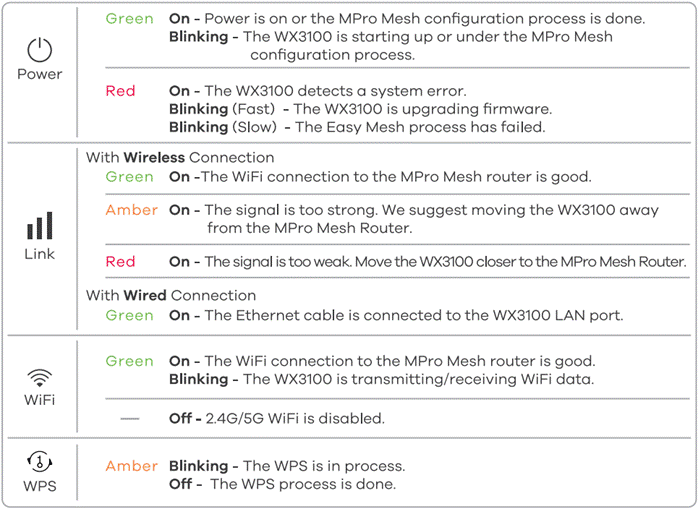
Use this LED table for the WX3100 to help you with the steps on the next page:
For multiple WX3100-T0 extenders, repeat all four steps for each extender.
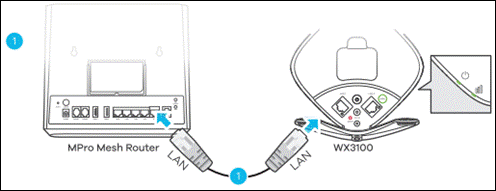
1. Use an RJ45 Ethernet cable to connect the WX3100 LAN port to the MPro Mesh Router LAN port. Then power on the WX3100 and wait until the POWER and LINK LEDs are steady green.
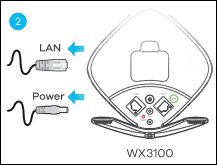
2. Unplug the Ethernet and power cable from the WX3100 (bring the power adapter with you for step 4).
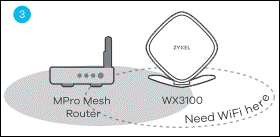
3. Place the WX3100 where you want to extend the wireless network. It must be placed:
a. Within Wi-Fi range of the MPro Mesh Router, or another MPro Mesh extender (like a WX3100).
b. With a power socket nearby.
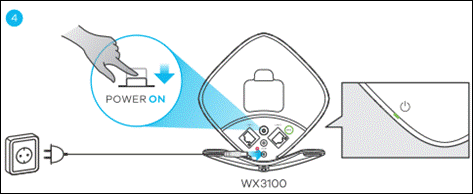
4. Plug in the power adapter, it may take a few minutes. Then make sure the LINK LED is steady green (preferred) or amber. Refer to the LINK LED rows in the table on page 1 to help with placement.
Was this article helpful?
That’s Great!
Thank you for your feedback
Sorry! We couldn't be helpful
Thank you for your feedback
Feedback sent
We appreciate your effort and will try to fix the article